Everywhere they've been, on one card you can post.
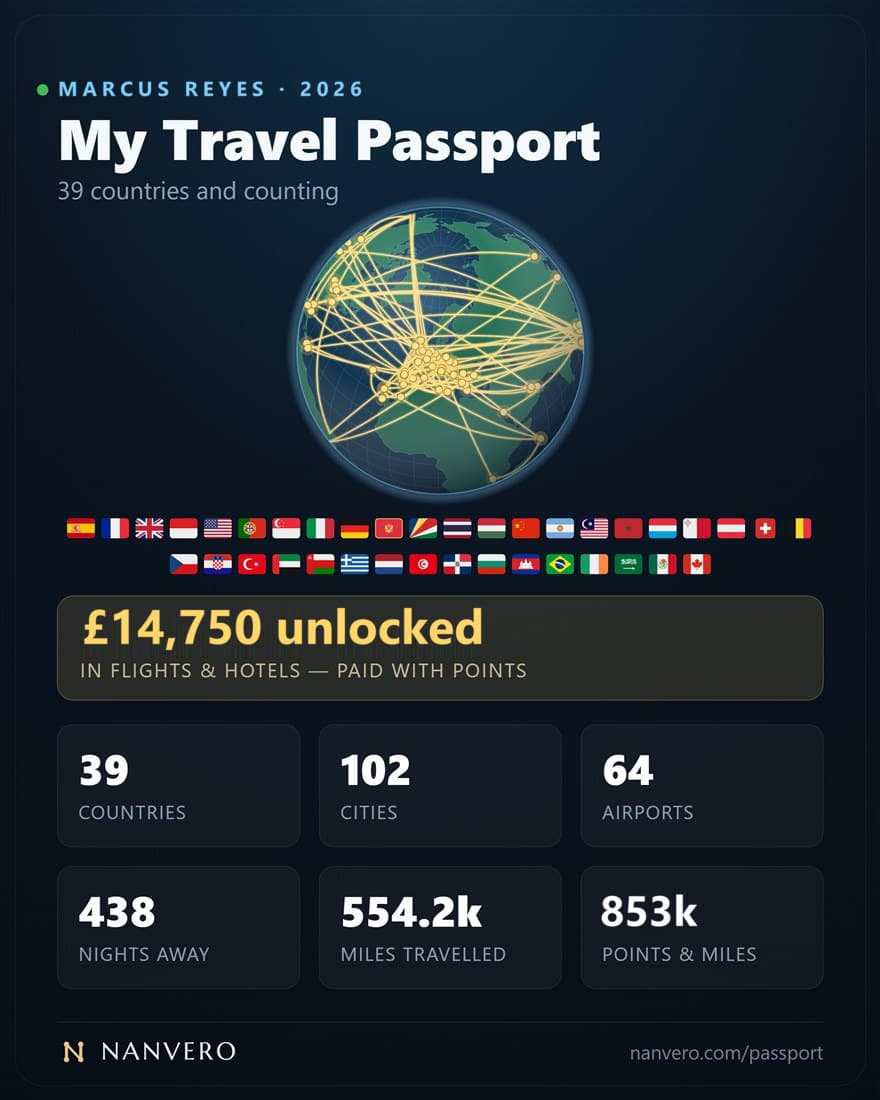
That card someone shared is a Nanvero travel passport — their routes drawn on a real globe, under the numbers they chose to show. Nobody typed it in: Nanvero drew it from the trips in their account. Yours can be next.
No loyalty passwords, ever14-day money-back on annual plansCancel anytime
What is a Nanvero travel passport?
A Nanvero travel passport is a shareable card of everywhere you've been, drawn from the trips in your Nanvero account — your routes arcing across a real globe, the countries you've visited filled in gilt, under the figures you choose: countries, cities, airports, nights away, distance traveled and what your points unlocked. There are no countries to tick off and no pins to drop; you download it as an image or a spinning GIF.
Your numbers, counted for you.
The travel figures come from the trips you've taken — the flights and the stays — and the points and value from the redemptions you log, so they're a record rather than a claim. You choose up to six before you export it.
On the card your choice
A still, or a slow spin.
Download the card as an image, or as an 18-second GIF with the globe turning under your routes — laid out at 1080×1350 for Instagram, X and WhatsApp. Or copy it and paste it into a post.
The globe is real
It is a projected Earth, not a graphic: continents, country borders and the day-night line at the moment you open it, turned to center on your own travel. Countries you have been to are filled in gilt, and each journey lifts off the surface as an arc between two cities.
Three steps, and it grows on its own.
- 01
Bring your trips in
Forward your booking confirmations — or connect Gmail or Outlook read-only on a paid plan — import a calendar, or add a trip by hand. Nanvero never asks for a loyalty password.
- 02
Your travel lights up the globe
Every place you've been fills in, with an arc for each journey in the order you took them.
- 03
Choose your figures, then post it
Pick up to six numbers, turn the globe where you want it, and download an image or a spinning GIF.
Questions, answered.
It is a Nanvero travel passport: a card of one person's travel, with their routes drawn on a globe and the numbers they chose to show beneath it — countries, cities, airports, nights away, distance or what their points unlocked.
They didn't build it by hand. Nanvero drew it from the trips in their account — the bookings they forwarded, imported or added — so it grows as they keep traveling.
The card is part of Nanvero Pro. Bring your trips in: forward your confirmations, connect Gmail or Outlook read-only on a paid plan, import a calendar file or add bookings by hand. Your globe fills in as they arrive, and you can download the card from the Map page whenever you like.
No. Nanvero never signs in to a loyalty account, so there is no loyalty password to hand over and no multi-factor prompt to approve. It works from the confirmations and statements those accounts already email you.
Travel you've already taken. Flights give airports; every booking with a city or country adds to cities and countries; nights away counts each night once, even when a hotel and a car hire overlap; distance is measured from the airport you fly out of most. Upcoming trips show as booked in the app but don't go on the card. Points and value come from the redemptions you've logged.
A 2160×2700 image, an 18-second GIF with the globe turning under your routes, or a copy of the card to paste straight into a post. Both are laid out at 1080×1350, the shape Instagram, X and WhatsApp show best.
No. The travel map and the shareable card it exports are part of Nanvero Pro, alongside Trips, Redemptions, the Playbook and history. The free plan covers your balances and offers — see the pricing page for the current rate in your currency.
Mostly. You choose which figures, flags and value band the card carries, and you can take your name off it. The header always says how many countries you've been to, and the globe shows where.
Everywhere you've been,
worth showing.
Point your travel email at Nanvero and let your own trips draw the card.
No loyalty passwords, ever14-day money-back on annual plansCancel anytime